
Tea Spins App (PWA) for Mobile Devices in the UK
Tea Spins doesn’t have a downloadable app from the App Store or Google Play — instead, it offers a Progressive Web App (PWA) that lets you create a new account or pick up your session right where you left off, without missing a beat. Lightweight, quick to add to your home screen, and just as user-friendly as a native app, the PWA is the all-in-one package you’ve been missing. With it, you can explore thousands of titles and access all the same perks — including the welcome bonus and The Spinning Scones Club — right from your phone.

Why There’s No Tea Spins APK
Tea Spins online casino doesn’t distribute an APK file, and you won’t find it as an installable app in the Google Play Store either. Instead of a downloadable package, Tea Spins runs as a Progressive Web App (PWA) — you access it directly through your mobile browser and add it to your home screen, with no separate file to install.
If you come across a “Tea Spins APK” on a third-party website, don’t download or install it. It isn’t an official release from Tea Spins, and APK files from unofficial sources are a common way scammers distribute malware disguised as casino apps — sometimes designed to steal login details or payment information. The PWA method described above is the only official way to get app-like access to Tea Spins, and it carries none of the security risks that come with sideloading an APK.
PWA vs Native App: What’s the Difference?
Tea Spins uses a Progressive Web App instead of a native app, and that’s a deliberate choice rather than a limitation. A PWA runs directly through your mobile browser and updates itself automatically every time you open it — there’s no app store listing to search for, no manual updates to install, and no separate installer file that could be faked or tampered with by scammers. It also means Tea Spins works the same way across virtually any modern smartphone, rather than being restricted to specific Tea Spins Android app or Tea Spins iOS app versions.
| Feature | Tea Spins PWA | Typical Native App |
|---|---|---|
| Installation | Add to home screen via browser | Download from App Store / Google Play |
| Updates | Automatic, happens instantly | Manual, requires user to update |
| Storage space used | Minimal — no separate install | Fixed storage footprint on your device |
| App store approval needed | No | Yes |
| Works across devices | Any device with a modern browser | OS-specific (separate Android/iOS builds) |
| Risk of fake/malicious versions | Low — accessed only via official site | Higher — fake APKs can be sideloaded |
| Offline play | Not supported | Sometimes supported |
Signs of a Fake Tea Spins App
Because Tea Spins only offers official access through its PWA — not a downloadable app — anything claiming to be a “Tea Spins app” from another source should be treated with caution. Here’s what to watch for:
- It’s offered as an APK file. Tea Spins doesn’t distribute an APK. Any site offering one to download isn’t official, regardless of how convincing it looks.
- It’s listed in the Google Play Store or App Store. Tea Spins isn’t published in either store. An app store listing using the name doesn’t mean it’s genuinely linked to Tea Spins.
- It asks for unusual permissions during installation. Requests for access to contacts, SMS messages, or device admin rights are a common red flag in fake gambling apps — the real PWA never asks for this, since it simply runs in your browser.
- It’s promoted through unsolicited links. Ads, pop-ups, or messages urging you to “download the official Tea Spins app now” from an unfamiliar link are a common phishing tactic, not how Tea Spins distributes access.
- The URL doesn’t match the official domain. Always check that you’re adding the PWA from Tea Spins’ real website, not a lookalike domain with a similar name or spelling.
If you’re ever unsure whether something claiming to be Tea Spins is genuine, the safest option is to go directly to the official site yourself and set up the PWA from there, rather than clicking a link from an ad, email, or third-party download page.
Tea Spins Download App Process on Android and iOS
Players in the UK can get the application on any smartphone for free. Just launch the smart device you want to get our program on. To download Tea Spins PWA in three steps:
- Access our official home page.
- Click on the menu button of the browser and find a TeaSpins Casino app.
- Choose the “Add to Home Screen” feature.
Our program’s shortcut will be sent to your home screen. Tap the app icon anytime to start your gambling session or manage your account.
Supported Device Types
You’ll be able to access the features and services of our mobile software no matter what type of device you use. Provided your smartphone meets our program’s basic requirements, expect to download, install and run the mobile version without issue.
Our top supported devices in the UK include:
- iPhones.
- iPads.
- Android phones.
- Android tablets.
We offer a progressive web app (PWA). As such, the mobile app is unmatched when it comes to mobile compatibility. The fact that our TeaSpins app can run seamlessly on almost any device makes the tool among the most easily accessible gambling software out there.
Tea Spins Mobile App Requirements
Since Tea Spins runs as a Progressive Web App rather than a downloaded app, there’s no fixed storage space or RAM requirement to worry about — you’re not installing a separate program, just adding a shortcut to your home screen. What you do need is:
- A reasonably current browser — Chrome 90+, Safari 14+, or Samsung Internet 14+
- An active internet connection (3G/4G/5G or Wi-Fi), since the PWA doesn’t store games locally for offline play
- A smartphone or tablet running Android 8.0+ or iOS 13+ for the smoothest experience
Exact browser and OS requirements can vary slightly by device, but if your phone can run a modern web browser, it can run Tea Spins.
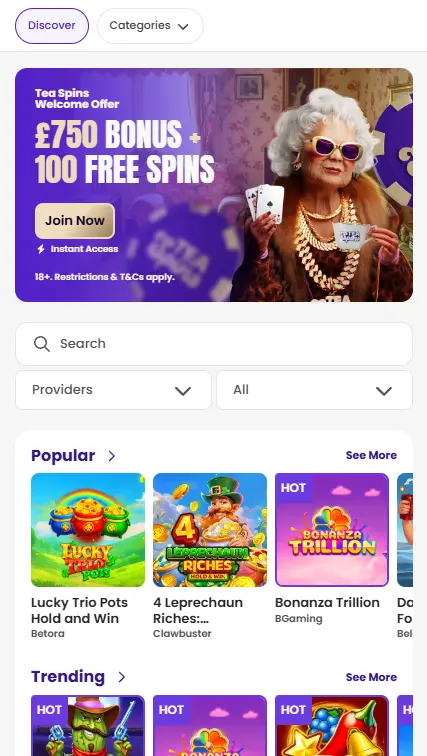
Mobile Interface
Our mobile software has a simple, clear white and purple interface, just like our official website. Because this app is designed to maximise the visual specs of your smartphone, its display is even sharper and crisper.
Launching this program for the first time, you’ll be met with a quick pop-up. You can use this to either create a player profile with us or sign in to an existing account. The mobile application then ushers UK gamers to a front page that offers quick access to our top and most popular titles on the Tea Spin app. You’ll also be able to find new releases and the entries with the biggest payouts right from here. Additionally, you can filter what you see according to elements like the software provider and the features of the title.
Select the menu button at the lower-left corner of the application to find our latest promotions. From the sidebar menu, you can also participate in mega payout tournaments and manage your account.
How to Play Our Mobile Games
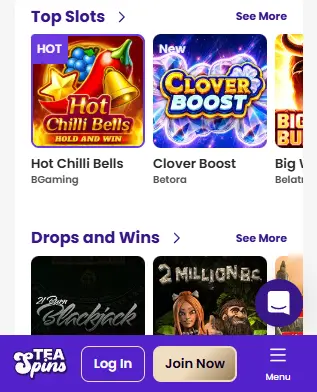
Finding your next big jackpot is super easy on our app.
- You can select any game from the “Popular”, “Recommended” or “Top Releases” section of the mobile app.
- Alternatively, click on the “Provider” field on the Tea Spin Casino app and choose any developer to display all their entries on our platform.
- There’s also the search bar, where you can input the name of any title to find and enjoy it.
- When you find something you like, tap the selection.
The mobile app lets UK users launch games in demo or real-money mode. So, you can either aim for big winnings or just entertain yourself casually.
Tea Spins Casino App Features
Our mobile app affords users in the United Kingdom top-tier multi-factor authentication for improved security. You also get faster reload speeds for our live casino games. We’ve also optimised the data usage of this software. So, using the TeaSpin app even over long periods won’t consume as much data.
In addition to giving you thousands of games and over a dozen active promotions, deposits and withdrawals couldn’t be smoother. We’ve got 7+ payment solutions you can use to cash out your winnings and fund your bankroll. Customer support is even more convenient to engage with this tool.
Mobile Security Features
We follow strict data protection policies and never collect information that isn’t crucial to managing your account. The application comes with two-factor authentication (2FA) support as well. With that, players can further protect their account and activity on our TeaSpin Casino app.
Our app is also subjected to intense security audits regularly, making it easier to identify and fix any loopholes in the system. This mobile program also links to the most secure payment solutions in the UK, so you can control your bankroll with the utmost confidentiality.
Top Mobile App Bonuses
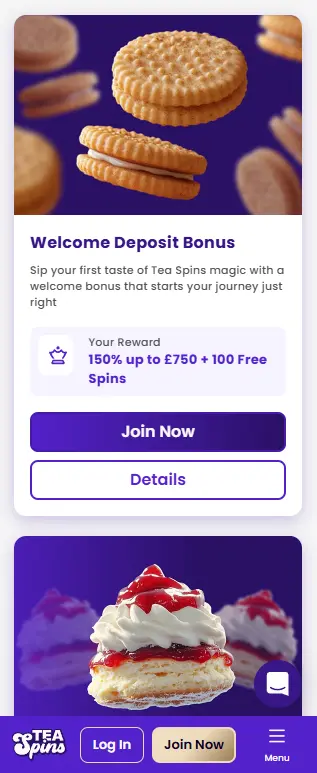
Gamers who use our mobile application can access great deals like Freshly Baked Spins. To claim this prize, just log in to our mobile program and stake at least 30 GBP on any title in the “New Releases” section.
Make sure to use the application to do this between 00:00 and 23:59 (UTC) on Tuesdays. Hit that benchmark and receive your 10 free spins reward on Tea Spins mobile immediately. This package has a 40x wagering requirement.
Another great promo available on this tool is Teatime Top-Up. This offer gives UK players 50% of their first deposit on Fridays. The max value of the mobile app bonus is 100 GBP. Cash in on this deal by using the code “TOPUP” when you fund your bankroll with at least 30 GBP.
Granny’s Gambit and Granny’s Get Back are two other promotions you can conveniently leverage via this program.
Pros and Cons of TeaSpins App
Here are the biggest perks and potential downsides of using our program in the UK:
| Pros | Cons |
|---|---|
| Access to 4,000+ games | Can’t be used with VPNs |
| Easy-to-use interface | Doesn’t support offline use yet |
| Massive promotions on Tea Spins Casino mobile | Can’t be used in many countries |
| Reliable customer support | |
| Multiple fast and secure payment methods | |
| Highly rewarding loyalty program | |
| Top-tier security features |
Overall, the Tea Spins app gives you all the right features to make your gaming sessions truly worthwhile.
FAQ
Is the Tea Spins PWA the same as an app?
It works like one — you can add it to your home screen and launch it with a tap — but technically it's a website that runs through your browser rather than a separately installed program. The experience is nearly identical, without the security risks of a downloaded file.
Why doesn't Tea Spins have an app on the App Store or Google Play?
Running as a PWA lets Tea Spins update instantly for everyone and work across virtually any smartphone, without needing separate app store approval or maintaining different versions for Android and iOS.
Will the PWA take up storage space on my phone?
Only a small amount for the home screen shortcut and cached data — nothing close to the storage a downloaded app would use, since the games themselves run through your browser rather than being installed.
Can I use the Tea Spins PWA without an internet connection?
No. Since nothing is stored locally on your device, you'll need an active internet connection to play, the same as using the desktop site.
I found a Tea Spins app on Google Play — is it real?
No. Tea Spins doesn't publish an app on Google Play or the App Store. Any listing using the name isn't officially connected to Tea Spins, and installing it could put your device or personal information at risk.
Do I need to reinstall the PWA after a browser or phone update?
No. Since the PWA isn't a separately installed program, browser or OS updates won't remove it or require you to set it up again.
Can I switch between the PWA and the desktop site without losing my session?
Yes. Both use the same account, so you can move between your phone and desktop mid-session without losing your progress or needing to log in again.